
Download Better Facebook – Chrome extension to organize your feed, hide read messages and keep the toolbar fixed
Overview
Better Facebook is a free Google Chrome add‑on that re‑imagines how you interact with the world’s largest social network. Built for users who feel overwhelmed by a never‑ending scroll, the extension declutters the Facebook interface, separates the news feed into intuitive tabs, and hides messages you have already read. By streamlining the visual layout, Better Facebook helps you focus on the content that truly matters—whether it’s catching up with friends, following your favorite pages, or staying on top of group discussions.
The tool also locks the Facebook toolbar to the top of the browser window, ensuring that navigation, search, and quick‑post functions stay within reach as you scroll through long timelines. All of these improvements happen without compromising the core Facebook experience; you still get the same posts, ads, and notifications, but presented in a cleaner, more manageable way. Because it runs directly in Chrome, Better Facebook works on any operating system that supports the browser, including Windows, macOS, Linux, and even Chrome OS.
The extension updates automatically through the Chrome Web Store, guaranteeing you always have the latest performance tweaks and security patches. Whether you are a casual scroller, a social media manager, or a power user juggling multiple groups, Better Facebook offers a simple, secure, and efficient way to make Facebook browsing feel less chaotic and more productive.
Key Features, Installation Steps & Compatibility
Feature List
- Feed Tab Segmentation – split your main timeline into customizable tabs (e.g., Friends, Pages, Groups).
- Hide Read Messages – automatically collapse conversations you have already opened, showing only new messages.
- Sticky Toolbar – keep the top navigation bar fixed while scrolling for instant access to search and posting tools.
- Minimalist UI – optional CSS tweaks that remove clutter, hide sidebars, and reduce visual noise.
- Auto‑Update – receives seamless updates from the Chrome Web Store without manual intervention.
- Privacy‑First Design – runs locally in your browser; no external servers collect your Facebook data.
Installation & Usage Instructions
Installing Better Facebook is a straightforward three‑step process. First, open the Chrome Web Store and search for “Better Facebook.” Click the “Add to Chrome” button, then confirm the permission request. Chrome will download and enable the extension automatically.
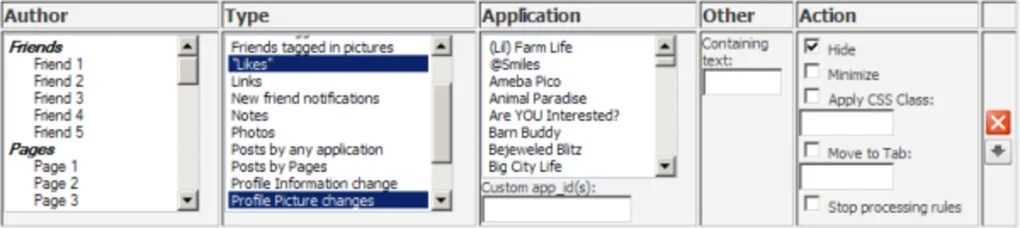
Once installed, a small icon appears next to the address bar. Clicking the icon opens a simple dashboard where you can enable or disable each feature, rename your feed tabs, and adjust the toolbar’s behavior. To start using the tab segmentation, simply click the newly added “Tabs” button on the top of your Facebook page; you’ll see separate sections appear, each showing posts that match the chosen category.
Hiding read messages works out of the box—any conversation you open will collapse after a short delay, leaving only unread chats visible. If you prefer a classic look, you can toggle the minimalist UI off in the settings. All changes take effect instantly without needing to reload the page.
Compatibility: Better Facebook works on any device that runs Google Chrome, including Windows 10/11, macOS Catalina and later, Linux distributions, and Chrome OS. Mobile Chrome browsers also support the extension, but the full feature set is optimized for desktop environments where a larger screen provides the best tab‑segmentation experience.
Pros, Cons & Frequently Asked Questions
Pros
- Significantly reduces feed clutter, making it easier to find relevant posts.
- Hides read messages automatically, keeping the inbox clean.
- Sticky toolbar improves navigation speed and reduces scrolling fatigue.
- Free, lightweight, and updates automatically through the Chrome Web Store.
- Runs locally—no personal data is sent to third‑party servers.
Cons
- Features are limited to Chrome; no native support for Firefox, Edge, or Safari.
- Tab customization may require a brief learning curve for new users.
- Some Facebook UI changes (e.g., major redesigns) can temporarily break the extension until an update is released.
Frequently Asked Questions
Is Better Facebook safe to use with my Facebook account?
Yes. The extension runs entirely in your browser and does not store or transmit any of your Facebook data to external servers. All modifications are applied locally, preserving your privacy.
Can I use Better Facebook on a Mac?
Absolutely. As long as you have Google Chrome installed on macOS (Catalina or newer), the add‑on works exactly the same as on Windows.
Does the extension affect Facebook’s performance?
Better Facebook is built to be lightweight. Most users notice a modest improvement in page load speed because the extension removes unnecessary elements from the DOM.
How do I report a bug or request a new feature?
You can open an issue on the extension’s support page in the Chrome Web Store or contact the developer via the “Help” link in the dashboard.
Is there a paid version with extra features?
Currently, Better Facebook is completely free. The developer has indicated that premium features may be considered in the future, but the core functionality remains at no cost.
Overall Rating: 4.5 / 5 – Better Facebook delivers a noticeable boost in usability without compromising privacy or speed.
Conclusion – Download Better Facebook Today and Browse Smarter
If you spend any amount of time on Facebook, the constant flood of posts, ads, and messages can become a productivity drain. Better Facebook offers a practical, free solution that re‑organizes your feed, hides read conversations, and keeps essential navigation tools within easy reach. Its seamless Chrome integration means you can start benefiting from a cleaner timeline within minutes of installation.
While the extension is limited to the Chrome ecosystem, the performance gains and visual clarity it provides are well worth the trade‑off for most desktop users. With regular automatic updates, a privacy‑first architecture, and a solid 4.5‑star rating from early adopters, Better Facebook stands out as one of the most effective browser add‑ons for social media power users. Don’t let an overwhelming feed slow you down—click the “Add to Chrome” button now, configure the tabs to match your interests, and experience a faster, more organized Facebook experience today.
Download Better Facebook – free, secure, and instantly improves your Facebook browsing.







